How to Build a Local RAG with PDFs Using Ollama, LangChain, Chroma, and Gradio

Ollama + LangChain + Chroma
A private AI assistant for your PDFs, running on your machine with no usage fees
If you want to move beyond generic chat and build something that feels like a real AI application, this is a great project to start with. In less than 30 minutes you can assemble a local RAG pipeline that reads PDFs, indexes their contents, and answers questions with actual context.
Everything here runs 100% locally, with no external API, no token costs, and full privacy.
In less than half an hour, you can have an AI assistant that reads ebooks, documents, technical articles, manuals, or any folder of PDFs and answers questions as if it were focused on that
material alone.
This architecture is called RAG (Retrieval-Augmented Generation) and it remains one of the most
useful foundations for real AI applications in 2026. The best part is that you do not just build
something portfolio-worthy. You also learn the fundamentals on the way.
Why this project is worth it
Section titled “Why this project is worth it”- RAG is one of the most common AI application architectures in real products, not just chat demos
- running locally gives you
privacy,control, andzero marginal cost - you learn
embeddings,vector search,chunking,retrieval, andpromptingin practice - the final result is a strong project for AI, automation, or intelligent backend portfolios
What you will learn
Section titled “What you will learn”- how to use
Ollamato run local models - how to build a RAG pipeline with
LangChain - how to use
Chromaas a vector database - how to generate embeddings with
nomic-embed-text - how to launch a simple and polished interface with
Gradio - how to connect all of that into an application that feels useful beyond the tutorial
Prerequisites
Section titled “Prerequisites”Python 3.10+Ollamainstalled fromollama.com- at least
8 GB of RAMfree, ideally16 GB - one or more PDFs to test with
1. Download the models in Ollama
Section titled “1. Download the models in Ollama”After installing Ollama, open the terminal and run:
ollama pull nomic-embed-textollama pull llama3.2This usually takes a few minutes.
If your machine can handle it, try
qwen2.5:7blater. It often performs better.
2. Create the project structure
Section titled “2. Create the project structure”mkdir rag-local-pdfcd rag-local-pdfmkdir pdfsThen place your files inside the pdfs folder.
3. Create the virtual environment
Section titled “3. Create the virtual environment”python -m venv venv
# Windowsvenv\Scripts\activate
# Mac/Linuxsource venv/bin/activateIf everything worked, you should see something like this in the terminal:
(venv) PS C:\Projects\rag-local-pdf>4. Install the dependencies
Section titled “4. Install the dependencies”pip install langchain langchain-community langchain-ollama langchain-chroma pypdf gradioThis can take a little while because there is quite a bit to download.
5. Create app.py
Section titled “5. Create app.py”Save this code as app.py:
import os
import gradio as grfrom langchain_chroma import Chromafrom langchain_community.document_loaders import PyPDFDirectoryLoaderfrom langchain_core.output_parsers import StrOutputParserfrom langchain_core.prompts import ChatPromptTemplatefrom langchain_core.runnables import RunnablePassthroughfrom langchain_ollama import ChatOllama, OllamaEmbeddingsfrom langchain_text_splitters import RecursiveCharacterTextSplitter
PERSIST_DIR = "./chroma_db"PDF_FOLDER = "./pdfs"
embeddings = OllamaEmbeddings(model="nomic-embed-text")llm = ChatOllama(model="llama3.2", temperature=0.3)
prompt_template = """You are a helpful and precise assistant.Answer ONLY based on the context below. If you do not know, say "I do not have enough information".
Context:{context}
Question: {question}
Answer:"""
prompt = ChatPromptTemplate.from_template(prompt_template)
if not os.path.exists(PERSIST_DIR) or len(os.listdir(PDF_FOLDER)) > 0:    print("Indexing PDFs for the first time...")    loader = PyPDFDirectoryLoader(PDF_FOLDER)    docs = loader.load()
    text_splitter = RecursiveCharacterTextSplitter(chunk_size=800, chunk_overlap=100)    splits = text_splitter.split_documents(docs)
    vectorstore = Chroma.from_documents(        documents=splits,        embedding=embeddings,        persist_directory=PERSIST_DIR,    )    print(f"{len(splits)} chunks indexed!")else:    vectorstore = Chroma(        persist_directory=PERSIST_DIR,        embedding_function=embeddings,    )    print("Vector database already exists.")
retriever = vectorstore.as_retriever(search_kwargs={"k": 4})

def format_docs(docs):    return "\n\n".join(doc.page_content for doc in docs)

rag_chain = (    {"context": retriever | format_docs, "question": RunnablePassthrough()}    | prompt    | llm    | StrOutputParser())

def chat(message, history):    response = rag_chain.invoke(message)    return response

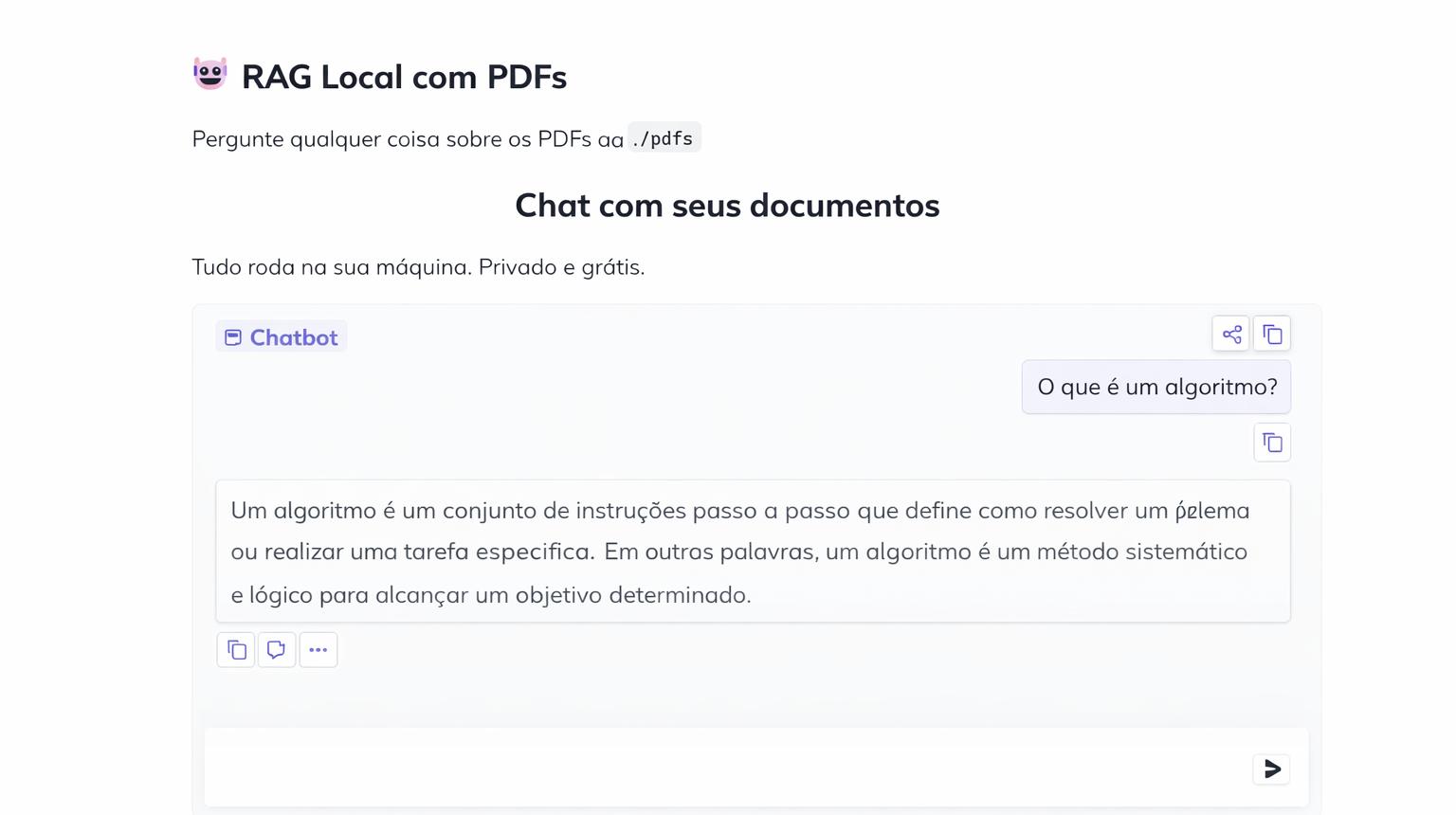
with gr.Blocks(    title="My Local AI - Chat with PDFs",    theme=gr.themes.Soft(),) as demo:    gr.Markdown(        "# Local RAG with PDFs\nAsk anything about the PDFs in the `./pdfs` folder"    )
    gr.ChatInterface(        fn=chat,        title="Chat with your documents",        description="Everything runs on your machine. Private and free.",        examples=[            "What is the main point of the document?",            "Summarize the text in 3 sentences",            "What does it say about [topic from your PDF]?",        ],    )

if __name__ == "__main__":    demo.launch(share=False)
6. Run the project
Section titled “6. Run the project”python app.pyOn the first run, it will load and index every PDF in the folder. Depending on the file sizes, this can take a few minutes and use a fair amount of CPU and memory.
If resource usage spikes, that is expected.
7. Test your RAG in practice
Section titled “7. Test your RAG in practice”When indexing finishes, open the link printed in the terminal. It usually looks like this:
http://127.0.0.1:7860This opens a friendly chat-style interface in the browser, except it is running on your own machine.
From there, the workflow is simple: ask questions about the PDFs and watch the model answer using retrieved context.
Response time depends a lot on your hardware. It will be slower than a paid cloud LLM, but in exchange you get privacy, predictable cost, and a much more concrete understanding of the architecture.
What is happening under the hood
Section titled “What is happening under the hood”At a high level, the flow is:
- the PDFs are loaded
- the text is split into
chunks - each chunk becomes an embedding
- the embeddings are stored in
Chroma - when you ask a question, the system retrieves the most relevant chunks
- the model answers using that context
That is the core of almost every serious RAG application.
Next upgrades worth trying
Section titled “Next upgrades worth trying”Once this is working, you can evolve the project with:
- PDF upload through the interface
- conversation memory
- citations with source and page number
- support for multiple collections
- model switching for performance comparison
- more refined index persistence
If you wanted a straightforward project for learning applied AI without relying on a paid API, this is one of the best places to start.
And when you open the project in the browser, the interface looks like this: